Until recently, I used generative AI (GenAI) for programming almost exclusively through the browser in the form of ChatGPT, Gemini, or via my own Ollama backend. My typical use cases ranged from “I need a function or a script that does …” to “There’s a bug in the following lines, how could I fix it?” A direct integration of GenAI into my development environments was not really on my radar. However, through my recent activities around OpenClaw, I kept running into coding assistants more often and I started wondering whether those assistants could be combined with (my) local large language models (LLM).
The Candidates
VS Code as an editor is nothing new, and neither the Copilot extension. I had simply never tried it before. Claude Code is Anthropic’s CLI-based development environment and so far (for me) it has a strong focus on Git workflows, project understanding, and structured refactoring. On the other hand, OpenAI offers Codex as a CLI variant for AI-assisted coding.
Installation and First Tests
VS Code worked as a regular editor right away. Claude Code and Codex could both be installed on my macOS system with just a few terminal commands. Setting up a local Ollama server in those tools was a bit more challenging. With Claude Code, in the simplest case, three environment variables with the connection parameters were enough. Codex was somewhat trickier. The profile configuration and model naming did not quite match up at first. Due to a current bug in VS Code, I initially couldn’t connect my own Ollama server there. My attempts with a proxy failed. So things escalated a bit: I switched to VS Code Insiders, checked out the Copilot extension locally from GitHub, built it myself, and integrated the extension directly. Looking back, this took by far the most time, especially compared to the other tools. However, classic YouTube examples such as Flappy Birds or Tetris could be tested surprisingly quickly. For me, it was once again a mix of “whoa,” “aha,” and a bit of “oh dear.”

Overall Claude Code works transparently and shows which files are being modified, including a GitHub-like diff view showing additions and deletions. Codex feels functional, but compared directly, the overall look and feel seemed slightly less polished to me than Claude Code. On the positive side, I really liked its suggestions about what meaningful next steps could be implemented. VS Code with the Copilot extension, despite the fiddly installation, delivered the best integration and usability for me, especially in combination with my own Ollama server.
Which Model Performed Best? Context Is King.
I prefer to use Ollama as my backend. Given my hardware setup, I am also able to test larger models locally. My first choice was qwen3-coder-next, a model recommended on the Ollama website. At first, the assistants behaved somewhat strangely with more complex requirements. After several tests, it became clear that my (default) chosen context window was too small. Normally, I work with a context window of around 4,096 or 8,192 tokens. However, when programming with Ollama, I achieved significantly better results with 64,000 or even 128,000 and more tokens of context. This obviously has consequences: higher VRAM usage, more load on the GPU or unified memory, and longer response times. Interestingly, VS Code with the Copilot extension felt more robust in this regard. I had to do less manual parameter tuning.
First Flappy Birds, Then WebGIS
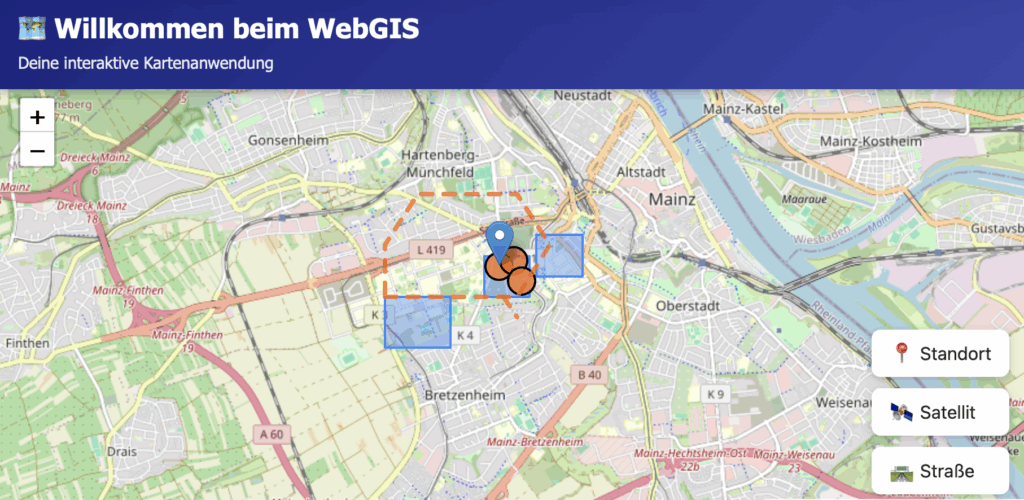
I conducted my tests using German prompts. Why German? In my experience, if it works well in German, it will definitely work in English. After starting the classic way with “Create Flappy Birds as a browser game.”, I moved on to a more realistic use case from geoinformatics: a simple WebGIS. My prompts, unchanged, were:
- “Please create a webpage with a map centered on Mainz.”
(German: “Bitte erstelle ein Webseite mit einer Karte, die auf Mainz zentriert ist.”) - “Please add additional layers, for example using GeoJSON.”
(German: “Bitte baue weitere Layer z.B. mit geojson ein”) - “Could you move the GeoJSON into a separate file that is then loaded?”
(“German: Könntest du die Geosjon in eine separate Datei auslagern die dann geladen wird?”) - “Using Python, create a server for the GeoJSON files.”
(German: “Erstelle mir mittels python einen server für die geojson files”) - “Do you know what an OGC Feature API is?”
(German: “Weisst du was eine OGC FeatureAPI ist?”) - “Yes, please implement it as an additional API.”
(German: “Ja, bitte als weitere API umsetzen.”) - “Could you also add another baselayer in the form of a WMS?”
(German: “Könntest du noch ein weiteres Baselayer in form eines WMS hinzufügen?”)
What used to feel like an entire semester of teaching to build a Leaflet map with a server, layers, and OGC interfaces was now possible in a basic version with just a handful of prompts. That is somehow impressive and at the same time thought-provoking.
What Does This Mean for Me?
I am seriously considering trying this kind of setup with students in the next semester. But one central question remains in the back of my mind: how much foundational knowledge is necessary to use such powerful tools in a meaningful, reflective, and sustainable way? If you do not understand HTTP, APIs, projections, or data formats, if you cannot debug, if you cannot read code, then you become heavily dependent on these tools instead of being able to use them in a controlled way.
For me, one thing is clear: “vibe coding” has arrived. And it is not going away. The question is no longer whether I use it. The question is how wisely I integrate it into my teaching.
Comments
6 responses to “From Flappy Birds to WebGIS: Testing Coding Assistants in a Local LLM Workflow”
[…] Neis described his experience of using LLM AI programming applications. He tested several AI coding assistants to […]
There are open source variants for those those CLIs. I’m using OpenCode combined with oh-my-opencode. They are connected to a LLM provider of your choice.
Three months ago I would have told you that I simply cannot program. That was a fixed fact in my mind. Your post about coding assistants and the “Flappy Birds path” reflects exactly the shift I have experienced since then.
I come from a completely different background and have no formal software development skills. Yet with the help of modern coding models, primarily Google’s Antigravity and similar assistants, I managed to build real projects. Two examples are openfiremap.org and the PWA hydrantenjaeger.de, both created step by step through conversations with AI.
The remarkable part is not that AI writes code. The remarkable part is that it allows people like me to turn ideas into working software. I can describe a problem, iterate on the solution, and gradually assemble something functional.
Three months ago these projects would have been impossible for me. Today they exist and are used by people in the OpenStreetMap and firefighting communities. That still feels slightly unreal, but also incredibly motivating.
Thanks for sharing this, Frank.
Your experience is a great example of the shift I tried to describe in the post. Coding assistants can help turn ideas into working tools much faster than before. And of course it will be interesting to see what else will be created in the OSM ecosystem because of this.
Pascal – I’m thrilled to see how our students, you, and your blog are really taking off in the fields of geoinformatics and surveying. Thank you for thoughtfully stepping up to the plate. Keep it up!
Thank you very much, Martin! I really appreciate it.