Some people are curious about how healthy their car really is, while others take their vehicles onto the racetrack where it is essential to avoid overheating or pushing components far beyond their comfort zone. You can, of course, buy small aftermarket performance data displays that many cars support, but some friends would rather save the money and ask me for help instead. And naturally it always begins with the classic line: “You are doing something with computers, right?”
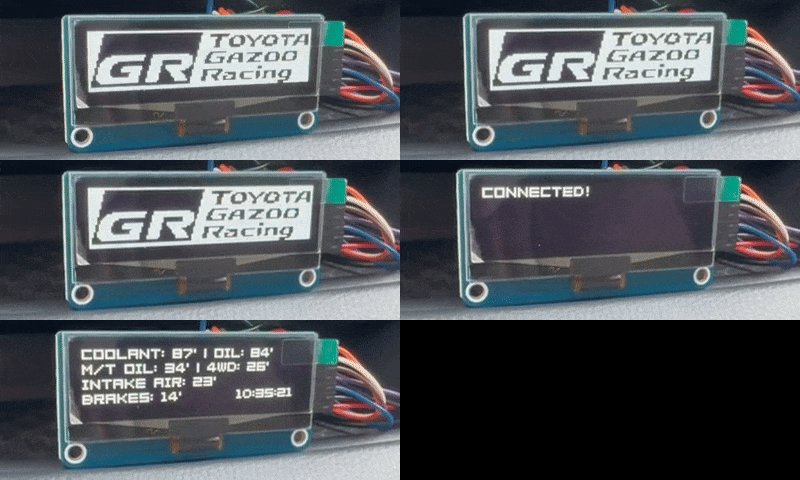
Most performance data displays have one thing in common: they use the OBD port of your car. This On Board Diagnostics interface provides access to the vehicle’s internal diagnostic systems and is usually located under the dashboard. Modern cars are required to offer an OBD II port, and online you will find plenty of adapters and connectors. I chose the Vgate iCar Pro Bluetooth because, according to my research, it works well with most Raspberry Pi devices. For this project I used a Raspberry Pi Zero 2 W to run my software, showing the values on a Waveshare 2.23 inch OLED HAT. The display can be attached directly as a HAT or connected with cables. Choosing the hardware turned out to be the simplest part of the entire journey.
Choosing the software
On GitHub you will find many open source projects that can read and display standard parameters such as coolant temperature, oil temperature and other basics, unless you drive an electric car. In my case the real challenge was not reading the standardised OBD II parameters or diagnostic trouble codes like P0xxx, C1xxx or U0xxx. What I really needed was access to the manufacturer specific diagnostic commands, the custom PIDs, used in extended protocols such as those from Toyota and BMW.
The learning curve
Before starting this project I had absolutely no experience with onboard diagnostics or with communicating with one or several ECUs (Electronic Control Unit). Entering this field, analysing header requests and responses, debugging byte sequences and doing a bit of reverse engineering turned out to be very interesting but also time consuming. Once you understand the logic it is not that difficult, but getting to that point was quite a rough ride. A helpful starting point was the following GitHub project, which I used in the beginning. Later on, due to some limitations and challenges, I wrote my own scripts which gave me more flexibility, particularly when working with the custom PIDs of different car manufacturers.
The first working prototype
After enough trial and error I ended up with a prototype that can read and display live data from both a Toyota and a BMW. It provides a real time view of the vehicle’s health and helps the driver decide whether it is time for a break or whether it is safe to keep pushing on the track. The custom Toyota PIDs from this thread were extremely helpful and so were the BMW custom PIDs from here.
Where this might go next
The most exciting part for me has been working with the custom PIDs. According to unofficial documentation, some BMW ECUs can even provide values such as longitudinal slope and bank angle. My next idea is to combine these measurements with geographical coordinates in the form of latitude and longitude and record the data for further analysis. Furthermore it could be very interesting to switch to the CAN bus instead of reading through the relatively slow OBD interface. Let us see where this goes …